
Best Practices for QA Teams Using QA Catalyst
In today’s fast-paced development landscape, QA teams need more than just test cases — they need smart tools and strategies that streamline their efforts. QA Catalyst offers a comprehensive solution for modern test management. In this guide, we share actionable best practices that help QA teams maximize the value of QA Catalyst—from test case optimization to real-time reporting and effective team collaboration.
Set Up Projects with Clear Goals
Start by structuring your QA projects in QA Catalyst with clearly defined objectives, timelines, and associated client or stakeholder details.
Best Practice:
Break down large initiatives into project modules and tasks to increase visibility and accountability.
Optimize Test Case Management
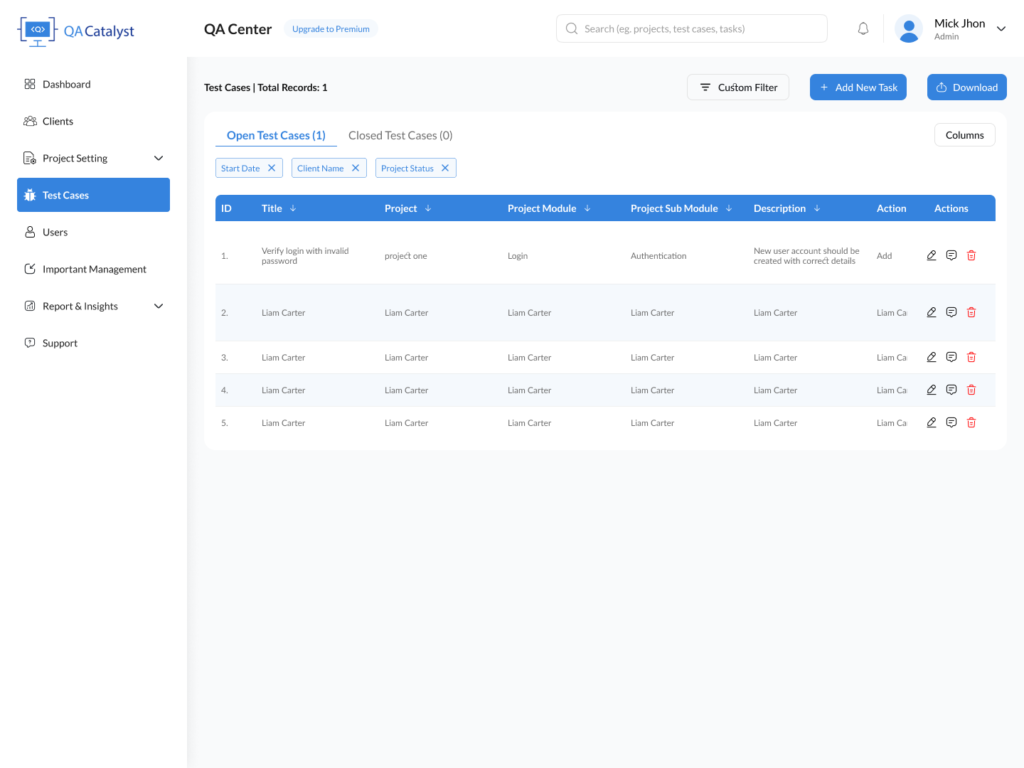
QA Catalyst allows you to create, assign, and categorize test cases efficiently.
Best Practice:
Use custom master data (like priorities, test case types, and results) to tailor your workflow and streamline execution.
Leverage Role-Based Access for Collaboration
Avoid bottlenecks and miscommunication by defining team roles. QA Catalyst supports role-based access to control visibility and actions based on team responsibility.
Best Practice:
Create roles for Testers, Leads, Project Managers, and Clients to encourage seamless collaboration without compromising data integrity.
Utilize Advanced Reporting for Insights
Make informed decisions using QA Catalyst’s analytics dashboard, which covers test case execution stats, time tracking, and task completion rates.
Best Practice:
Regularly review reports filtered by date, status, or team member to evaluate bottlenecks and performance
Encourage Communication with Built-in Comments
Use the commenting system within tasks and test cases to foster ongoing dialogue among QA team members.
Best Practice:
Enable feedback loops by tagging team members in test cases needing clarification or rework.
Regularly Import/Export Data
Whether you’re transitioning from a legacy system or sharing data with stakeholders, QA Catalyst’s import/export tools make the process effortless.
Best Practice:
Use the bulk import feature to onboard tasks, test cases, or users quickly. Use Excel export for stakeholder reporting.
Why QA Catalyst Outperforms Traditional QA Tools
Compared to outdated systems, QA Catalyst empowers teams with:
- Modern, intuitive UI
- Customizable workflows
- Real-time collaboration features
- Scalable project management
- Advanced analytics and reporting
Final Thoughts
Following these best practices ensures that your team leverages the full power of QA Catalyst. With features that enhance QA team collaboration, test case optimization, and reporting, QA Catalyst is more than a tool—it’s a catalyst for QA success.